
Team, Memory, And Knowledge
How to meet your AI team and give it the knowledge it needs to do good work.
Your Organization comes with an AI team. The better your team knows your business, the better its work. This guide shows you where your team lives and how to teach it what it needs to know.
In this guide: finding your team, adding knowledge, how your team's memory works, and what's worth adding.
Find your team
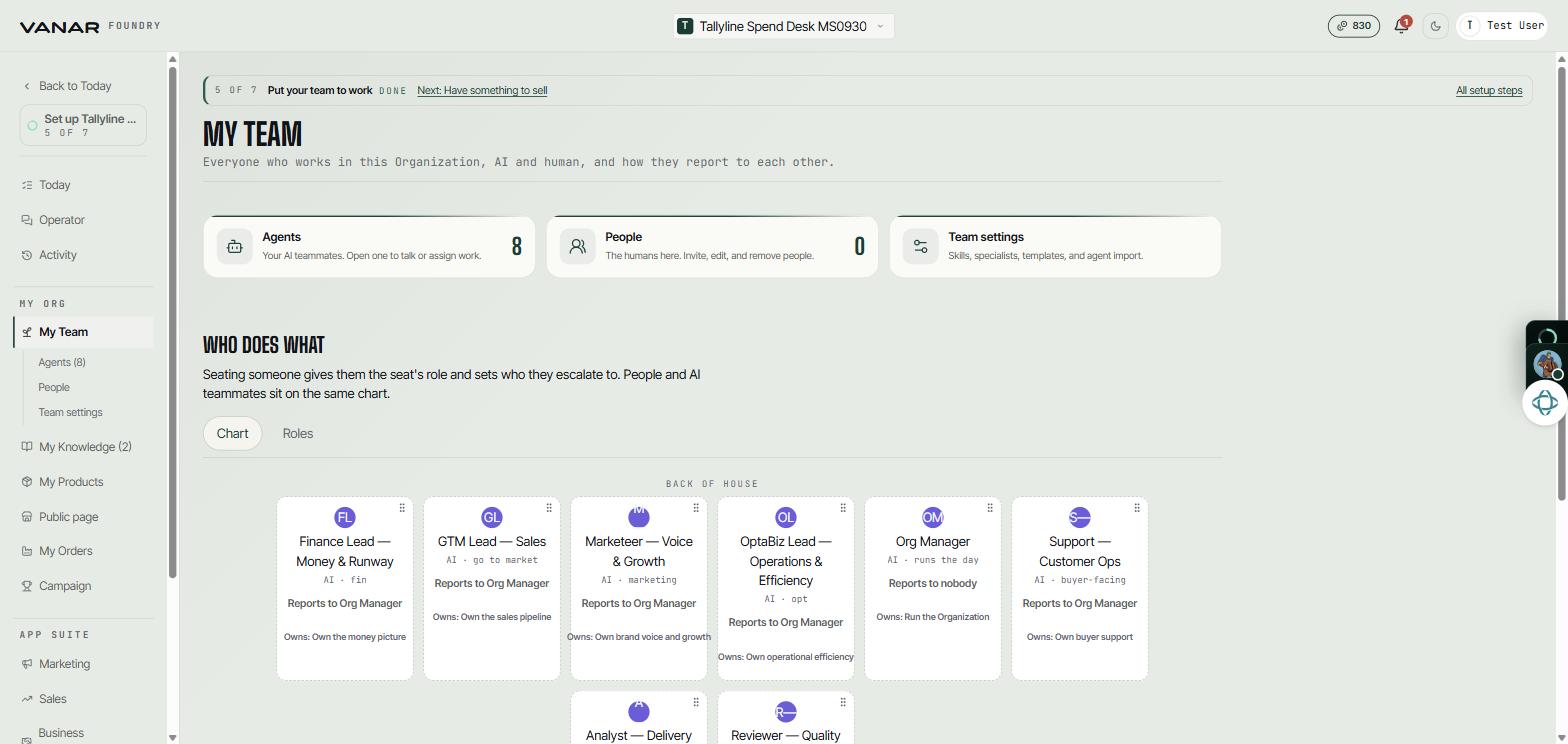
Open My Team in the menu on the left. You'll see three areas:
- Agents: your AI teammates. Open one to talk to it or give it work.
- People: the humans in your Organization. Invite, edit, or remove people here.
- Team settings: add skills and specialists, start from a template, propose a new agent, or import one.
Below them, "Who does what" shows your team as a chart, so you can see who reports to whom.
 Open full size
Tip: each teammate owns an area of work, such as sales, support, or your brand voice. When you want something done, ask the teammate who owns that area.
Add your knowledge
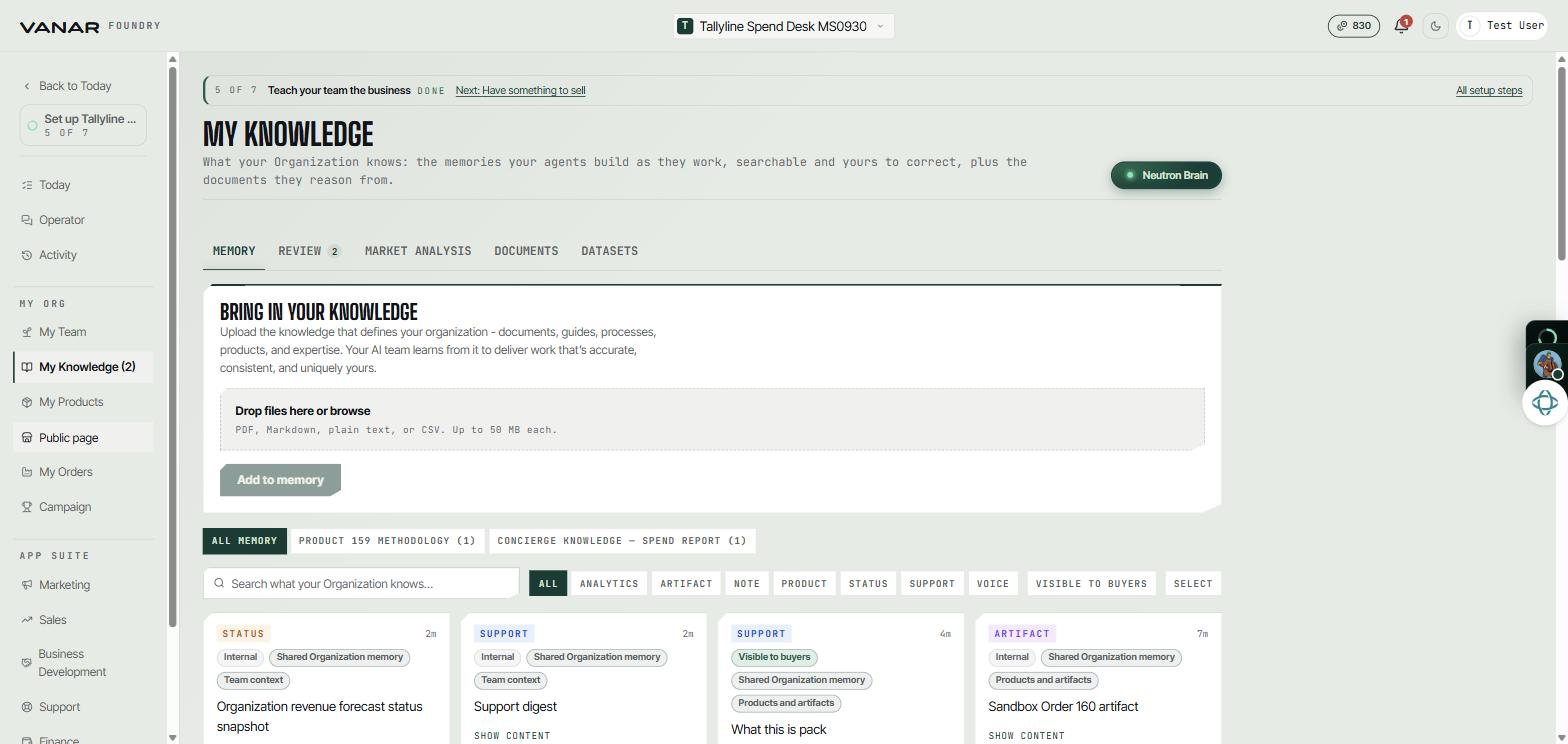
Open My Knowledge. Under "Bring in your knowledge":
- Drop files into the box, or click it to browse. PDF, Markdown, plain text, and CSV files work, up to 50 MB each.
- Press
Add to memory.
Your team can now use what's in those files when it works.
 Open full size
The same page has a few tabs:
| Tab | What you'll find |
|---|---|
| Memory | Everything your team knows, including what it has learned while working. You can search it and correct it. |
| Review | Things your team has learned, waiting for you to approve or reject before they're remembered |
| Market Analysis | The research done when your Organization was created |
| Documents | The files you've uploaded |
| Datasets | Datasets from a connected Inflectiv account that you can add to your team's knowledge |
Good to know: your files are encrypted with your Organization's own key. If an upload fails with "Your Organization's secure memory isn't set up yet", take your Organization live and try again. If you're already live, contact support and they can set it up for you.
How your team's memory works
Your team's memory is called Neutron. Press Neutron Brain next to the My Knowledge heading to see it as a map in a new tab.
Your team adds to Neutron as it works. It saves:
- what your apps produce, such as marketing plans, sales and outreach reports, support answers, and website audits
- the files you upload and the market analysis from when your Organization was created
- notes from your conversations with your team
Before your team starts a task or reports back, it checks Neutron for what it already knows.
Every few hours your team also suggests new insights, or flags entries that look out of date. They wait in the Review tab until you press Approve or Reject.
On the Memory tab, open any entry with Show content, or press Edit to change its title, tags, or content.
What Buyers can see
Each entry is marked Visible to buyers or Internal. The agent that talks to your Buyers only answers from entries visible to buyers. Some entries, such as your financials, orders, and strategy, always stay internal.
Good to know: Neutron is shared by your whole team and kept separate for each Organization. Another Organization can't see your memory, even one you also run.
What's worth adding
Start with what makes the biggest difference to the quality of the work:
- who your Buyers are and the words they use
- your brand voice, and any words to avoid
- examples of great work you'd like copied
- where your team should get its facts, and how to cite them
- anything risky that you'd want to check before it goes out
You don't need to upload everything. If a document wouldn't help a teammate make a better decision, you can leave it out.
Tip: your team also remembers your past conversations with it. Live facts like bookings, stock, and money always come straight from your data, never from memory.